![logo_ezt_white.png]](https://support.eezytrace.com/hs-fs/hubfs/logo_ezt_white.png?height=40&name=logo_ezt_white.png)
Here are the steps to easily find it:
Steps to find the tablet’s number:
-
Open the Eezytrace app.
-
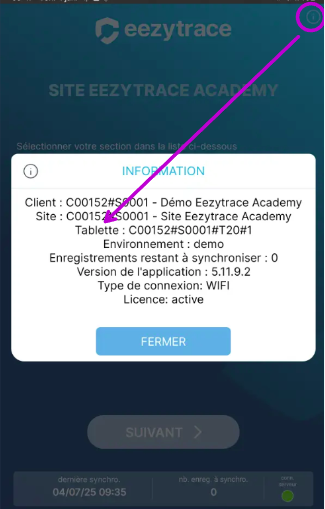
Once in the app, tap the “i” icon in the top right corner of the screen.
-
An information window will open:
-
The tablet number appears on the third line.
-
It is in the following format:
C000XXX#S00XX#T0X#X
-
👉 Important: Please provide us with this complete number so we can accurately identify your tablet and best address your request.
📩 Need help?
If you encounter any difficulties or have further questions, please don’t hesitate to contact us:
📧 assistance@eezytrace.com
📞 +33 9 75 18 28 32