![logo_ezt_white.png]](https://support.eezytrace.com/hs-fs/hubfs/logo_ezt_white.png?height=40&name=logo_ezt_white.png)
The data update downloads the configuration from the Espace Manager to the Eezytrace app on the tablet: changes to checks, users, storage units, suppliers, documents… It runs automatically in the background every few minutes. You can force it manually so you do not have to wait for the next cycle.
Steps
Open Eezytrace and go to the user page.
Quickly tap 5 times on the date and time of the last synchronization, at the bottom left of the screen.
A pop-up window appears.

Tap the “Data update” button.
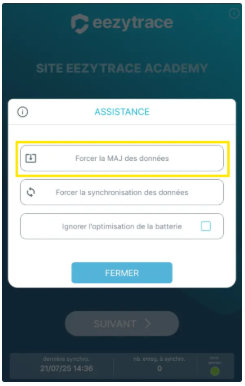
A small circle spins on the right while the app updates the data.
When the update is finished, the message “Update complete” (or “No update needed” if everything was already up to date) appears.
💡 Example: a new user does not appear
You added “Employee 4” in the Espace Manager, but the tablet only shows employees 1, 2 and 3. Run a data update as described above: Employee 4 appears as soon as the update is finished. The same method applies to any change made in the Espace Manager (processes, records, storage units, suppliers, documents…).
❓ Processes or records are still missing
Check that the indicator at the bottom right is green (tablet connected).
Run a data update again.
Ask your manager or quality manager to check in the Espace Manager that your user profile gives access to these processes.
If the profile is correct, your contact person asks support for a configuration update: +33 9 75 18 28 32 · assistance@eezytrace.com.