![logo_ezt_white.png]](https://support.eezytrace.com/hs-fs/hubfs/logo_ezt_white.png?height=40&name=logo_ezt_white.png)
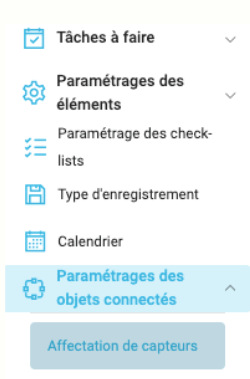
🔗 Why use this configuration?
-
✅ Continuous and reliable temperature monitoring,
-
✅ Centralized data accessible directly in Eezytrace,
-
✅ Time savings: no more manual data entry.
🛠️ Steps for pairing the IoT sensor
-
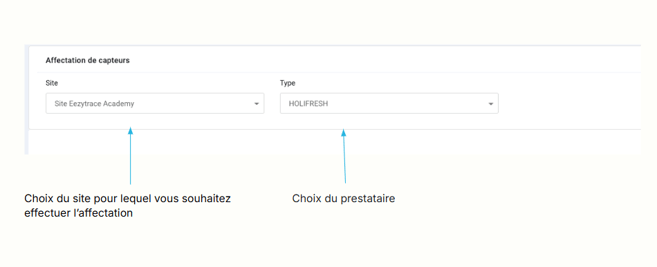
Select the relevant site,
-
Select the service provider,
-
Select the storage facility from the drop-down menu,
-
Confirm the pairing.
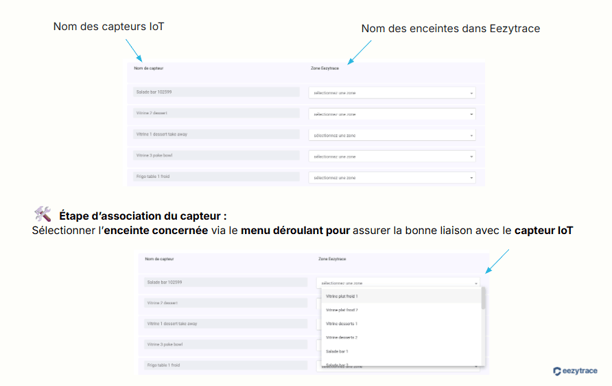
👉 Once the association is complete, the fields appear grayed out, indicating that the sensor is successfully linked to the selected storage unit.
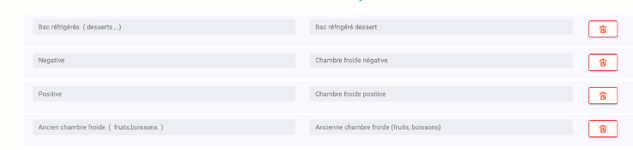
🗑️ Edit or delete a link
-
To correct or remove a link, click the trash can icon.
-
You can then reassign the sensor to another enclosure if necessary.
✅ Expected result:
Your speakers are continuously monitored, temperature readings are reliable, and directly integrated into your Eezytrace monitoring dashboards.